Tales from the Man who would be King

Rex Jaeschke's Personal Blog

Making Good-Looking Documents

clock December 18, 2011 13:09 by author Rex Jaeschke

© 2011 Rex Jaeschke. All rights reserved.

[When I first posted this essay, important formatting information was lost. As a result, in a few places I've inserted pictures of the original Word document formatting instead of the actual formatted text. Unfortunately, a few of these don't look very good, but that's the result of posting to this blog site, not on the feature itself.]

These days, everyone's an author, whether it is writing casual emails, letters to friends, papers for school, or proposals for work. Very few people have access to a secretary who, in days gone by, would take one's draft and type it up neatly correcting spelling and grammar mistakes and generally making it look professional along the way.

I have long maintained that form is just as important as content, perhaps even more. The best-written text can be ignored if it is presented poorly. Now while a so-called good-looking document might not be worth reading, people will be more likely actually to read it, at least for a page or two because it is good looking.

In this essay, I'll point out a number of things one can do to make a document more attractive and, therefore, more likely to be read. I have been writing for wide circulation and publication for more than 25 years, and I am completely self-taught in both writing and layout. I can say with complete certainly that I've learned a few things not to do!

Although I now happen to use Microsoft Word (2010 edition) for all my word processing, this essay is not about learning that application or indeed any specific tool. Rather, it's about things that one should be able to do in any modern word processor.

The good news is that popular word processors provide a number of standard document templates and default settings, so one doesn't have to configure everything. These include margins, font type and size, paragraph format, and line spacing, all of which can be overridden, as you need and get more advanced.

One very important thing to understand is that the better looking a document is, the less you will notice its layout. You'll simply find the document easy to read and pleasant to follow without necessarily being able to say why. On the other hand, if the document contains many typefaces and font sizes, bold, italic, and underlined text, all mixed in together you will remember how truly bad it looked possibly to the extent that you were never inspired to read it, or that you remember the form but not the content. [Remember, nothing is a complete waste, it can always serve as a bad example!]

Don't use your Word Processor as a Typewriter!

If you find yourself using your word processor as a typewriter, STOP! A word processor is configurable and can do many things for you if only you'd let it. So stop trying to help it by applying manual formatting. Specifically,

  • Don't add extra spaces to the start of a paragraph to get that line indented. Instead, configure paragraphs to have the indenting you want, so that if you change your mind later, all paragraphs can be adjusted automatically by reconfiguring that property.
  • Don't use blank lines to try and get better spacing and/or page breaks. Instead, configure paragraphs to avoid widows and orphans (see below).
  • Don't use one or more tabs to arrange things in tabular form; instead, define a table and use that.

Page Width, Number of Columns, and Justification

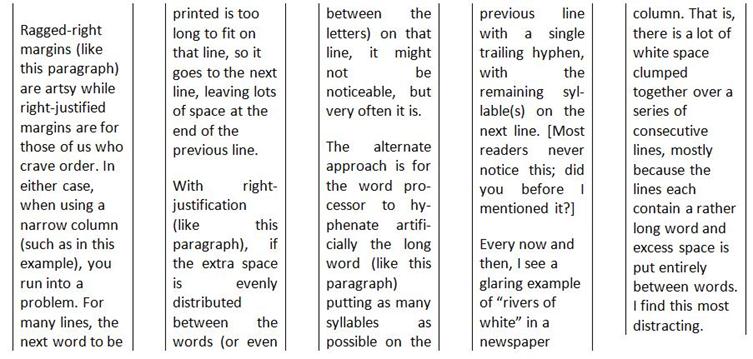
Right now, stop reading this essay, and go and look at samples of the following kinds of publication: a newspaper, a novel, a glossy magazine, and a textbook. Compare the sizes of their pages, the number of columns per page, and whether the right-hand edge of text lines up with the right margin (that is, lines are right-justified) or not (that is, the lines are set ragged-right). Now using that information, look at the following columns:
Avoiding Bad Line Breaks

Lines in the same paragraph are broken by the word processor at the space between consecutive words or after a real or artificially added hyphen. However, there are certain inter-word spaces where one should not break a line. For example, in the text "10 people", "year 2001", and "5th birthday", ordinarily, it is bad style to allow a line break to occur at any of the inter-word spaces. To ensure such a break doesn't happen, one must use a non-breaking space instead of a regular space.

Occasionally, one uses some text that contains one or more hyphens, neither of which one wants to be a candidate for a line break. For example, every legal US resident gets assigned a Social Security Number of the form 123-45-6789. Ordinarily, one would want to read this number as a whole item, all on the same line. To ensure this, one must use a non-breaking hyphen instead of a regular hyphen.

It is quite common to end a paragraph with a word that contains three or fewer letters. In such cases, it is also a good idea to precede such a word with a non-breaking space, to avoid that short final word's being on a line on its own (that is, being an orphan).

Avoiding Bad Page Breaks

According to Wikipedia, "In typesetting, widows and orphans are words or short lines at the beginning or end of a paragraph, which are left dangling at the top or bottom of a column, separated from the rest of the paragraph."

Personally, I think that orphans are more distracting than are widows. In any event, both should be avoided as much as possible. Check your word processor's widow and orphan controls.

In general, word processors treat text as a set of paragraphs, with headings and subheadings also being paragraphs, but set a bit differently. In this section, I have used the heading "Avoiding Bad Page Breaks". It would be bad form to have a page break occur between that heading and the following paragraph. Of course, as one edits a document over time, the addition and removal of text often causes page breaks to occur in different places. Rather than hoping to notice bad page breaks and "fix" them manually, one should be able to format the heading using some sort of "keep with next paragraph" property, so a page break will never occur immediately after it.

All Those Fonts and Typefaces

Let a new user loose on a word processor and pretty soon, he'll probably have discovered the myriad of fonts, typefaces, and point sizes, and tried to use many of them in the same document. This definitely is one instance in which less is more. Have too many visual distractions and the reader will be looking at the form only!

In my early days of computer-generated text processing, my printers had only a fixed-width typewriter font, which made for less-than-interesting documents. [At the very beginning, I actually worked on a popular computer system whose character set did not even have lowercase letters!] The advent of laser printers really opened up the use of proportional fonts and character sets with large numbers of symbols, including Greek letters, subscripts, superscripts, common fractions, and so on.

Getting the Reader's Attention

There are a number of ways of emphasizing text; they include the following:

  • Centering it across the column or page –

This is useful for titles and subtitles
and for setting poems and wedding invitations.

  • Setting it in bold – Do this sparingly; too much of it is equivalent to shouting.
  • Setting it in italic – This is used effectively for one or two words at a time, foreign words or phrases, or quotations.
  • Setting it with underline – This really is a holdover from typewriter days when there was no alternative. Don't use it unless required by a style guideline.
  • Setting it in bold and italic with underline – Okay, that would get my attention and you an F on your paper I am grading.
  • Using a different typeface – This is most often used to distinguish between different levels of headings and regular text. [I use this approach a great deal to distinguish computer-programming keywords from their English counterparts.]
  • Using a different point size – This is most often used to distinguish between different levels of headings and regular text.
  • Indenting the left (and possibly the right) margin of paragraphs borrowed from some other source (such as a poem or quotation).


If you would not be forgotten
As soon as you are dead and rotten,
Either write things worth reading,
Or do things worth the writing.

Benjamin Franklin

  • Adding shading to a word, sentence, or paragraph.
  • Adding some ruled lines or
  • Using small caps – All lowercase letters are converted to uppercase, but are set in a slightly smaller point size than uppercase letters. For example, "Hello There" in small caps becomes
  • Using drop caps – Ordinarily, this is only used to start the first word of the first paragraph in a section; for example:

  • Setting it in a different colored foreground and/or background – Of course, while the use of colors on-screen can be effective, printing the resulting document on a black and white printer may limit its usefulness.
  • Make the text blink – I can imagine this being used as a temporary placeholder.
  • Use any number of other visual effects your word processor might provide.

Using the Right Form of Dash

Although standard keyboards usually provide only one kind of hyphen-minus key, other dash-like characters are useful and generally available. For example:

  • The humble "-" – Use this for a hyphen. It can also be used as a minus sign, although a better alternative might be available if you want a minus sign to have the same width as a plus sign. [We already mentioned the non-breaking hyphen earlier.]
  • An em dash – This dash has the width of the letter M in the current typeface/font. Use an em dash to insert an aside into a sentence, as in "He met Mary—a woman he'd dated many years earlier—on his way home from work." Some writers put a space either side of an em dash; I don't. Typically, a pair of em dashes is interchangeable with a pair of parentheses.
  • An en dash – This dash has the width of the letter N in the current typeface/font. Use an en dash to separate the endpoints of a range, as in, "numbers 1–5" and "Monday–Friday". [Using an ordinary (that is, a breaking) hyphen might cause an unwanted line break before the end value of the range.]

By the way, if you find yourself adding artificial hyphenation manually, you are using your Word Processor as a Typewriter.

Setting Margins

Large documents have pages that are usually printed on both sides and bound, either along a vertical edge or along the top edge. This requires that care be taken setting the page margins, so that left-sided (verso) and right-sided (recto) pages accommodate the bound edge.

Headers and Footers

Although adding these is easy, all too often they are missing from documents. Note that the contents of verso and recto pages might vary, and that the first page of a chapter/section might differ from both verso and recto. For example, the first line(s) of a chapter will ordinarily have the chapter number and name set in some special manner, in which case, it would be distracting (not to mention redundant) to also have that same information on that page's header immediately above that line.

Then there is the question of page numbering and number position. In single-sided documents, page numbers are often right justified or centered at the bottom. In two-sided documents, page numbers are often justified at the outer margin or centered at the bottom, or justified at the outer margin at the top.

The inner margin of the footer is a good place to put a Copyright notice.

Adding Asides

Occasionally, it is useful to supplement the main text with information that might be useful, but which is not essential. Such additional text should be presented in such a way that it is obviously not as important as the main body. The most common ways of doing this involve putting the extra text in the following places:

  • Inside parentheses or square brackets, right in the body of the main text
  • Inside a footnote
  • Inside an endnote

The latter two approaches allow longer asides without distracting the reader. And when reading such documents in their native electronic form, one can usually jump to the accompanying note by clicking on the note marker in the main text. [Some people, including me, dislike endnotes in printed documents, as they can be hard to find.]

Lists

A good word processor should support both numbered and bulleted lists, as well as lists nested within a list, at least up to three levels deep. Note that the more sophisticated systems will let you replace the bullet with any number of alternate symbols.

If you find yourself formatting lists manually, you are using your Word Processor as a Typewriter.

Tables

It is true that a picture can be worth a 1,000 words, and so too can a table. The main things to consider when creating a table are, as follows:

  • Set column headings in some emphasized way (bold, italic, larger point size, for example). If there are multiple heading lines, set them differently, and maybe make the first line span all the columns. It can also be useful to shade headings in grey or some other color.
  • If the final row is a summary or totals row, set it in a special way, perhaps like that for headers.
  • For very long tables, request that headings be repeated at the top of each continued page.
  • If the cells in any row contain more than a few lines of text, consider whether individual rows can be broken across page breaks or whether all the lines in row must be on the same page.
  • Take care when choosing the alignment of the table, column headings, and cell contents.

If you find yourself formatting tables manually, you are using your Word Processor as a Typewriter.

Adding Temporary Notes

Larger documents may be written over days, weeks, or even months, in which case, the author might like to leave placeholders about details yet to be determined or items to be done. See if your word processor provides a comment-tracking facility such that you can display or hide comments, or move through the set of comments mechanically without having to scan the text a page at a time looking for them.

More Advanced Options

There are many other things one might consider when formatting a document. And while they can require some investment of time to learn, they add a more sophisticated look to one's documents. These include the following:

  • Links – these allow the on-line reader to jump to web pages, to places within the same document (via bookmarks, a special case of which is a forward reference), and to other documents.
  • Tracked changes – this facility allows the changes to a previous edition to be tracked, so a reader can see both the old and new versions allowing her to proof the changes.
  • Automatically numbering of figures and examples
  • Adding pictures or photos and optionally having text flow around them
  • Adding front matter pages before the first chapter/section, with such pages having Roman page numbers
  • Providing a Table of Contents
  • Adding a cross-reference index

Conclusion

Never distribute a document (or an email, for that matter) without running it through a spelling checker, and if possible, a grammar checker. Assuming you have such tools, not using them is just downright lazy! I guarantee you that your credibility will suffer if the document contains obvious spelling and grammatical errors. [It truly is stunning how many native English speakers don't know when to use there vs. their and its vs. it's, for example. A good checker will detect such misuses. However, I doubt any checker is infallible; I override mine on a regular basis.]

A final word of warning: If you get too anal about document layout, you will spend much more time critiquing a document's layout than you do reading its content. And while that might be appropriate when proofing a highbrow literary article, it's inappropriate for documents having a short shelf life, such as newspapers and personal communications.

Happy publishing!


Books by My Bed

clock October 18, 2010 16:13 by author Rex Jaeschke

© 2010 Rex Jaeschke. All rights reserved.


Ok, I admit it. I'm a non-recovering bookaholic! They say that admission is the first step to recovery, but, frankly, I'm not at all interested in recovering. I hope I'll be addicted to books until I die. And after that, I may well be a librarian in one of those places that starts with 'H'.

The Road to Addiction

So how did it all start? Well, first there was the casual, innocent browse at the newsagent's comic book stand. That was followed by annual book gifts from various sources. That led to a library card. Sure, I told myself, these books were only for recreational use, and I could stop reading anytime I liked. But whom was I kidding? I needed a chapter, sometimes two, on a daily basis. Eventually, I found bigger libraries and others who loved books as much as I did, maybe even more! There was a big wide world of addicts out there; there were others just like me. I was not alone. I moved on to harder stuff like history, geography, biographies, and, yes, animal husbandry, which contained lurid descriptions of the form and purpose of the naughty bits of the various farm animals that I studied in Agricultural Science. I knew it was wrong, but I was spiraling out of control. But what to do? [To all you fans of the Prairie Home Companion radio show, wouldn't this be a good time for some Be-Bop-A-Re-Bop rhubarb pie?]

My First Library

From age 7–12, I lived on a 4,000-acre wheat and sheep farm. The stone farmhouse was quite large, the walls were thick, and the ceilings were very high. Each bedroom has its own fireplace, and each fireplace had a long, high mantelpiece. I had a large bedroom all to myself.

Up to age 11, I attended two different rural schools. The first was three miles from my house and was run in the village hall. Besides that building, the village consisted of a general store with post office and house attached, a public tennis court, and a railway siding with storage sheds for bags of cereal grain. When we got down to four students, the school closed, and we were bused to the next town, a booming metropolis with not one, but two stores, a post office, a school and schoolhouse, a church, 10 houses, and a larger railway siding. That school had 25 students, in seven grades, all in the same room with the same teacher.

Each month, a wooden crate of books arrived at the local railway siding from the state lending library. In effect, they were being lent to the school, which, in turn, lent them to its students. Although the school had a few reference books of its own, half of the books available for borrowing were replaced each month. That is, the school library contents almost completely rotated every two months.

At the end of each school year, we students put on a concert involving acting and singing. [Due to their extreme lack of ability to carry a tune, certain students—no including moi—were told to "just move your lips" without actually making a noise!] And each student was given a book of fiction bought from money raised by the School Welfare Club. Similarly, each year at Sunday School, each kid got a book of fiction.

By the time I was 10, my collection of books totaled 20. [The only other books in the house were a set of encyclopedias and some penny-dreadful novels, of the western and detective persuasion.] Of course, with such a large number of books, how would I ever be able to keep track of them? What I needed was an organized system.

After a long period of serious thought (that must have lasted at least 60 seconds) I had "a plan more cunning that the plan devised by the Professor of Cunning at Oxford University". [There you go Black Adder fans!] I would create a library, complete with catalog. Undaunted by the magnitude of the task at hand and having no knowledge whatsoever of the Dewey Decimal System of Classification, I soon came up with a stunningly simple scheme. I would number my 20 books starting at 1 and going all the way up to 20! It was brilliant, and it worked. I arranged them on the mantelpiece of my bedroom.

[Some 45 years later, as I peruse my bookcases I see four books from that original collection. They are:

  • Uncle Tom's Cabin by Harriet Beecher Stowe
  • Bishop Jim by Joyce Reason
  • The Racketty Street Gang by L.H. Evers
  • Hanna-Barbera's Huckleberry Hound Giant Story Book]

Mr. Dewey Goes to Work

At some point during my high-school years, I had an epiphany: the gateway to everything and anything was through books. No matter what one's circumstances were, one could always go to a library and borrow a book. And the only limits to what one could learn by reading were the selection of books available and the extent of one's own imagination. [With the ubiquitous internet, the selection limit has been removed completely. And libraries have become places to get free internet access, so access to information is no longer a problem for those who truly are looking.]

My parents had no interest in what I was studying at high school, and so they never questioned my requests for education-related books or supplies. As a result, I always bought new copies, and to this very day, I have all my high school textbooks from Year 10 (1967) onwards and all those from my nine years as a part-time university student.

By the age of 21, I was well and truly addicted to books, and I owned more than 750 of them. My pride and joy was a spanking new Encyclopedia Britannica set. During the next few years, my collection increased to about 1,000.

I'd long ago abandoned my 1–20 numbering system, but having spent a lot of time in libraries and bookstores I was acquainted with several cataloging systems. As a result, I purchased the 10th Abridged Edition of the Dewey Decimal Classification handbook (1971). From among the various author-cataloging systems, I chose the Cutter-Sanborn Three-Figure Author Table invented by Richard A. Cutter. I set about figuring out each book's abridged catalog and author codes, and I typed them on small labels, which I affixed to the spine of each book. It took several months part-time for me to catalog the whole collection. Along the way, I built a 9 foot-by-9 foot bookcase set for my treasures.

Early in 1976, I started Computing Science classes at the then South Australian Institute of Technology, which gave me access to a card-punching facility. Eventually, I got all the book records "punched up" and I wrote some COBOL programs to print my catalog in different orders. [Later on, I moved the data to a DEC PDP-11 system and rewrote the programs in Fortran. Much later, with the advent of PCs, I moved the data to my own computer and rewrote the programs in C.]

A Long Separation and a Joyous Reunion

In June 1979, I left Australia for an open-ended period to take up an initial 1-year work contract in the US. As you might imagine, it's hard enough to decide what basics to pack in two suitcases for a one-way trip abroad without having to think about any books I might want. In the end, I did pack several work-related books I thought might be useful. Finding a not-so-temporary home for 1,000 books was also an interesting challenge, but a friend came to the rescue. (Thanks very much Bill.)

A month before my departure—which was a totally planned 2-week trip across the Pacific via an Air New Zealand DC-10, through the US, and then on to Washington DC—an engine fell off the wing of an American Airlines DC-10 near Chicago. (Don't you just hate that when that happens?) In any event, all DC-10s around the world were grounded indefinitely, including my flights on Air New Zealand. Eventually, I traveled via Asia and across the Atlantic; however, that route limited luggage by weight rather than by size (or vice versa; I don't remember which), and I could take only one case. Fortunately, the ruthlessness of having to pack the important things from my life into two cases stood me in good stead when it came to halving them. Who needs pajamas, socks, and underwear anyway?

Five years later, I had settled permanently in the US and had bought a townhouse. It was time to bring my babies home. So, on my next trip to Australia, I packed all my books—and a few other things that had been in storage—and took them to a shipping office at Port Adelaide for the long sea voyage to Philadelphia, Pennsylvania. [The port of Baltimore, Maryland, would have been more convenient, but that option was not available at that time.] Back home, I was notified when the container carrying my boxes had docked, and I rented a small covered truck to pick them up in Philadelphia, a 3-hour drive to the northeast. Within several days, I had all the books shelved in my large basement office, and I had installed a comfortable sofa and reading light where I could read, admire, and caress my beauties.

"Out of Sight" is "Out of Mind"

Some years later, I moved my office two flights up, primarily to get away from the very cold temperatures of the basement, most of which was underground. As my new office was much smaller than my old one, I could not take many of the books with me. Whereas I'd seen my collection every day for some years, I no longer saw it unless I went to visit it specifically. Eventually, I put a bookcase on the main living area and rotated selections of books through that, so I'd be reminded of their existence.

So What Books do I Really Have by my Bed?

Here they are in the order in which I picked them off the floor:

  • Historical Atlas of the 20th Century. Maps, maps, and more maps, with timelines.
  • Philip's Standard Reference Atlas [of the world].
  • Reader's Digest The Bible Through the Ages.
  • Canada's Incredible Coasts.
  • Atlas of World History.
  • The Atlas of North American Exploration.
  • Hammond Atlas of the 20th Century.
  • The White House: An Illustrated Tour.
  • America's National Parks.
  • The World: Afghanistan to Zimbabwe.
  • The American Presidents. A 2–3-page summary of each president from George Washington to Bill Clinton.
  • The Chronicle of World History, a 670-page tome that covers events from 3500 BC to 2008 AD. Most articles run half a page, and many have photos or maps. Each major period starts with a series of essays.
  • Countries and Continents, 320-page book in which each country has photos and a page of text in the form of questions and answers. Each country's summary contains the flag, currency, system of government, capital, main languages spoken, area, population, religion, and notable features.
  • Modern Mathematics. It's a great refresher course on things such as logic; sets, relations, and functions; whole numbers, rational numbers, real numbers; probability, statistics; and geometry.
  • The Old Farmer's 2010 Almanac. "The Original Farmer's Almanac, useful, with a pleasant degree of humor, including weather forecasts for 16 regions of the United States, planting tables, and Zodiac sheets."
  • The Faith Instinct: How Religion Evolved and Why it Endures, by Nicholas Wade. I read a review of this in the Economist, and went and browsed a copy at a bookstore. Although I have yet to read it, it's one of the few books for which I paid nearly full price.
  • Biting the Wax Tadpole: Confessions of a Language Fanatic. It's a collection of linguistic trivia [and a gift from recent houseguest Felicity].
  • Our American Government, 2000 Edition. A book of questions with answers and information, published by the US Government.
  • Paddington at Work, by Michael Bond. I must say that I do like Paddington Bear. [Before Paddington Railway Station in London was renovated, I made the pilgrimage there to see him in a large glass showcase complete with his labeled luggage "From Darkest Peru" and a note from Aunt Lucy. Now, there is a much smaller homage to him.]
  • Maps of The Caribbean, Central America, & South America and Fairfax County, Virginia.
  • The Constitution of the United States of America. The Constitution, unratified amendments, and an Analytical Index, published by the US Government.
  • How Our Laws Are Made. A book of questions with answers and information published by the US Government.
  • Earth: The Definitive Guide to Our Planet. This fine Smithsonian publications runs 500 pages and is chock full of pictures, charts, and short pieces.
  • The Complete History and Wars of Ancient Greece.
  • Life: Evolution Explained.
  • The Annotated Alice: Alice's Adventures in Wonderland & Through the Looking Glass, by Lewis Carroll.
  • The Unfinished Nation: A Concise History of the American People.
  • American Government: Everything You Need to Understand Our Democratic System. Part of the "Essential book" series.
  • Barack Obama: Words That Inspired a Nation. Book and DVD [gift from friend Phil].
  • Regional Cooking from the Southwest.
  • Economist, Special Holiday Double Issue, December 19, 2009. Contains a set of great essays.
  • Santa Fe Rules, a novel by Start Woods.
  • Portrait in Death, a novel by J.D. Robb.

As you can see, almost all of these books contain reference material. Most cost $3–10, and have many photos, drawings, and/or maps. Almost all have relatively short articles, making it easy to pick one up at random to learn or be challenged over a cup of coffee.

Conclusion

While most of my books are more than 30 years old they still have value. To be sure, a lot of new information has been discovered or developed in most fields since they were published, but the fundamental principles remain intact. In any event, most used bookstores wouldn't take them even as donations. And with the advent of the internet, most people under 30 seem to be little interested in books in general. But that's their problem.

So what do I think about the new electronic book readers? For novels, they seem like a fine idea, but most of my reading involves reference works with lots of color photos and maps printed on rather large pages. Besides, I like the smell of most books (although I must say that, occasionally, I do come across one that simply stinks). Besides, if I really want to browse on-line material, I can always fire up my 10-inch netbook computer.

You may well ask, "Don't all those books take up a lot of space?" Of course, but I still have room to get in and out of bed, and room for more books too. And if I really run low on space, I can always get rid of the some non-essential stuff like furniture, except for the bookcases, of course!


News and Information

Spring arrived several months early in Northern Virginia, although Rex took a long while to take his first canoe ride on the lake. Several times he's thought seriously about working, but in most cases has resisted the urge. He's a big believer in quality over quantity! Menwhile, he's devouring many novels.

Rex is based in Reston, Virginia, USA, where he can be reached at rex@RexJaeschke.com. To learn about his professional lives, see www.RexJaeschke.com and www.ProgrammingClassroom.com.

[I have activated the reCAPTCHA authentication facility. To be able to post a comment, you must enter the two words exactly as shown. If you cannot read the words you have to enter, press the "Get a new challenge" button to get a different pair of words.]

If you wish to submit a comment, see "Rules for Submitting Comments" elsewhere on this page. If your "comment" contains no references to specific ideas or topics in the corresponding post, it will be rejected as SPAM. Questions and feedback about BlogEngine, the display theme used, and technical issues should not be posted as comments. Instead, they should be sent to Rex via email. Even then, most of those likely will be treated as SPAM.

Sign in